













Enjoy Mobile Casino Gaming Anywhere with the Bitkingz Mobile App
We’ve made mobile gaming easier than ever with the Bitkingz mobile app. Whether you’re at home, on a break, or traveling, our mobile app keeps your favorite games right at your fingertips. It’s fast, secure, and mirrors our full website with smooth functionality.
There’s no need to sacrifice features for convenience. With Bitkingz, everything you need is always one tap away.
What Is Mobile Casino Gaming?
Mobile casino gaming is all about playing your favorite casino games from a smartphone or tablet. It’s become the go-to way to enjoy games because it fits modern lifestyles. People want flexibility and quick access—and that’s exactly what mobile apps offer.
The Bitkingz experience on mobile is smooth and reliable. We’ve designed the Bitkingz app to deliver fast loading, intuitive menus, and high performance across most devices. Whether you're using Android or iOS, the result is the same—quick access and engaging gameplay. Most mobile apps today let players deposit funds, play games, contact support, and more. That means there’s no real difference between playing from a desktop or mobile. With just a few taps, you’re fully connected to the entire casino platform.
How to Download the Bitkingz Mobile App
You don’t need to search far to get our app. It’s already waiting for you. The installation process is easy and quick—just follow a few steps and you’re good to go. Before you begin, keep in mind that the mobile version of Bitkingz is a Progressive Web Application (PWA). That means you can install it directly from your browser without visiting an app store. It works on Android devices and also integrates well on iPhones through Safari.
Here’s how to get started:
- Step 1: Open the official Bitkingz website using your mobile browser (Chrome or Safari recommended).
- Step 2: Log in or create your account.
- Step 3: Tap on your browser menu and select "Add to Home Screen."
- Step 4: Confirm the name (you can keep “Bitkingz” or rename it).
- Step 5: The icon will appear on your phone like any mobile application.
- Step 6: Tap it anytime to access the full casino app experience.
Our mobile apps reflect the full functionality of our platform. You’ll get a full-screen interface that runs fast and feels natural. Whether you’re spinning reels or checking your profile, everything works smoothly. Once installed, the Bitkingz app behaves like any other application. There’s no need to download anything from outside sources. The setup is secure and reliable.
How to Navigate and Use the Bitkingz App
Using the Bitkingz mobile app is straightforward. From the home screen, you’ll find game categories, search tools, and access to your account settings. Every part of the app is optimized for touchscreens and loads quickly.
The Bitkingz app interface is broken into easy-to-access sections:
- Main lobby – Shows trending games, latest releases, and personalized suggestions.
- Game categories – Slots, table games, live dealers, and more are just one swipe away.
- User profile – Track your balance, play history, and loyalty status.
- Support – Contact our 24/7 help desk with just a tap.
If you’re new, you can complete the registration process in under two minutes. Just tap “Sign Up,” fill out your details, and confirm your email. Your account will then work on both the website and app—the site and mobile version stay fully synchronized.
You can even claim bonuses directly from the app. Just head to the promotions section and choose the offer that fits your playstyle. We’ve worked closely with top gaming software developers to ensure smooth performance, even in demo play mode. This is more than just a mobile casino app—it’s your full casino experience in your pocket.
Play Directly from the Bitkingz Mobile Site
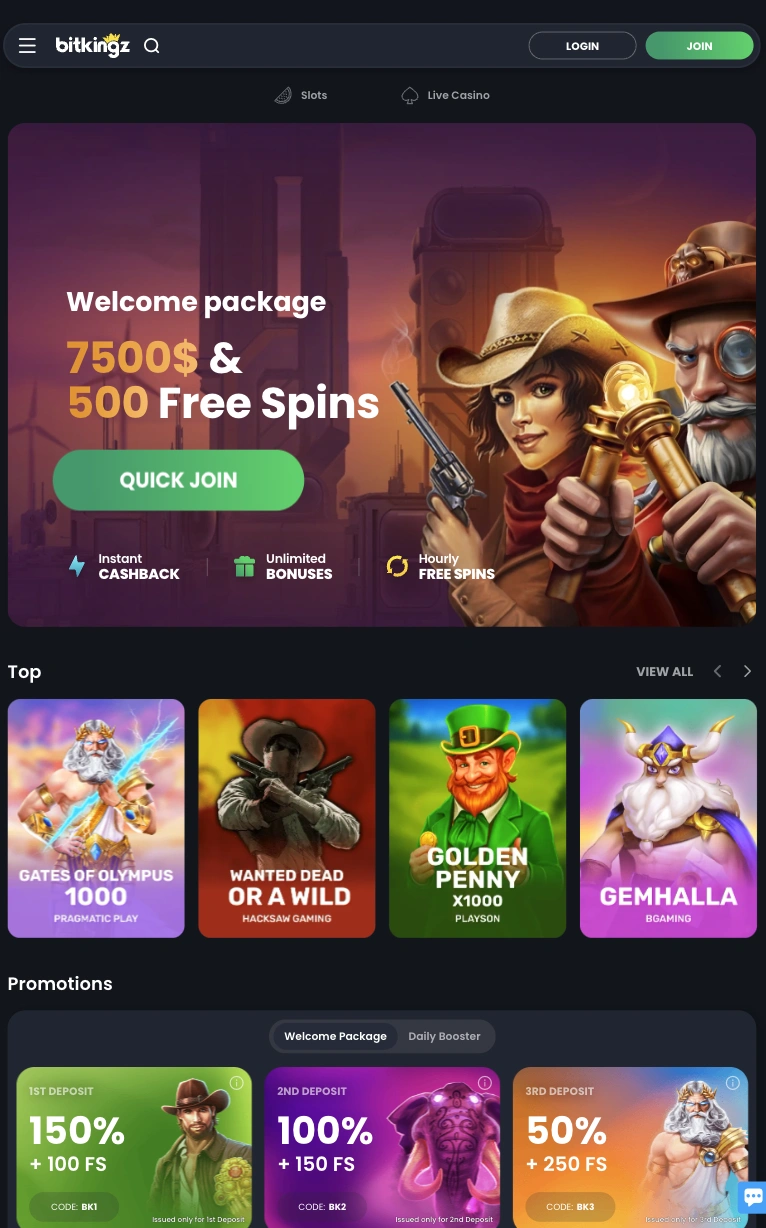
Not ready to install the app? No problem. Our Bitkingz mobile site gives you everything you need right from your browser. It’s sleek, responsive, and requires no download at all. Whether you’re on iPhone, Samsung, or tablet, you’ll get a familiar layout with fast-loading pages. The Bitkingz app and the mobile site look nearly identical. Menus adjust to your screen size, and controls are built for swiping, tapping, and scrolling.
From the homepage, you’ll find:
- Login and Sign Up buttons at the top
- A scrollable banner showing current promotions
- Game thumbnails with filters for providers, types, and new releases
- Tabs for support, profile, deposits, and bonus claims
Each section loads fast—even on mobile data. You won’t experience lag or glitches. The easily accessible casino slots app interface gives you everything you’d find on desktop. Our registration process without issue means you can sign up in just a minute. After confirming your email, you’re ready to make your first deposit and begin your journey.
The Bitkingz mobile version is designed to keep you in the game, whether you’re waiting in line or relaxing at home. Want a more app-like feel without installing anything? Just use the “Add to Home Screen” option and enjoy instant access.
Stay Safe While Using the App
Keeping your information secure is a top priority. That’s why we always recommend using only the official Bitkingz site and tools to install the app. Never download from third-party app stores or unknown websites. Unofficial versions may look the same but can steal your data, hijack your account, or gain access to your payment info. Only trust verified sources.
When creating an account, make sure to set a strong password. Avoid using public Wi-Fi when logging into the app or the desktop site. Enable two-factor authentication for an extra layer of security. Every player is eligible for a welcome package, and you can receive it directly in the app. Just follow the same safe procedures as on desktop.
The Bitkingz mobile version uses secure SSL encryption and trusted payment methods. Whether you’re depositing, withdrawing, or browsing games, your data stays protected. Before cashing out, don’t forget to verify your account. This step is important for security and prevents delays later on. The Bitkingz mobile app follows the same strict rules as our desktop platform. You can feel safe every time you log in.
Pros and Cons of the Bitkingz App
There’s a lot to love about playing from the app, but we believe in giving you the full picture. Here are the upsides and the trade-offs.
Pros:
- Full access to games, support, and features
- Clean layout built for mobile navigation
- Quick loading even on slower connections
- Synced with desktop account
- Secure and private usage
Cons:
- Not available in every country
- May require manual setup on some devices
- Screen size limits compared to desktop view
Still, the mobile version is a smart choice for those who want freedom and portability. We’ve made it as user-friendly as possible while keeping all core functions intact.